
Your lender reporting, prepared and checked before you sign.
For the CFO, controller and accounting team who prepare and sign reporting for their lender. Upload the latest files, review what CORA prepares and flags, and sign on CORA.
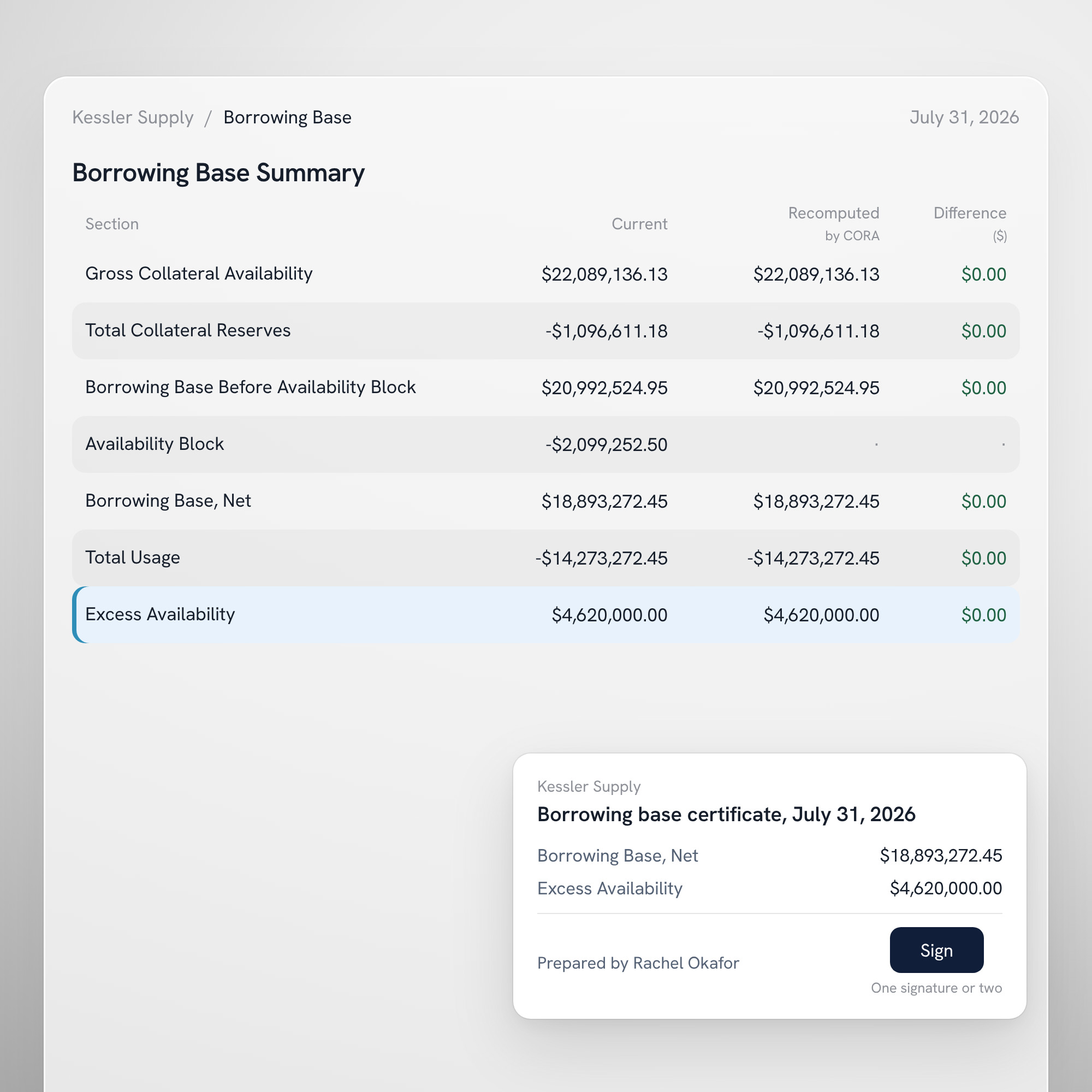
At a glance
Ready to send
The signed certificate, the reporting pack, the compliance certificate and the statements, kept with the period they belong to.
Deadlines in view
What is due, when and to whom, mapped from the agreement into a calendar, with each period opened for you when it is due.
Your own workspace
Separate from your lender's platform. Your lender receives what you choose to send, and nothing else.
In detail
Set up once, from the documents you have.
Name the facility and add the credit agreement, the certificate workbook you send today and your last reporting package. CORA reads them and builds the setup: the terms with their sections, the covenants, the advance rates and eligibility, and the reporting deadlines. Review it with CORA at your side, answer what the documents leave open, then sign to activate it.
- Each term quoted with its section
- The first borrowing base calculated and compared with your workbook
- A later change is a new version on the record, made by you
Upload. Review. Sign.
The period opens on your calendar when it is due. Add the files, and CORA calculates each line under the rules you confirmed, tests the covenants and names any difference from your workbook in plain words. Resolve it, ask CORA about it, or note why it stands, then sign and download the package.
- The signed certificate, the pack and a read-me in one zip
- Sent the way you always have
- Recorded as sent: to whom, when and which files
One signature or two, behind your authenticator.
Choose whether the company signs alone or names a second signer, and the certificate waits for both. Each signature asks for a fresh code from the signer's authenticator, and the signed PDF carries each signer's name, title and time.
- Administrator, Signer, Preparer and Viewer roles
- A fresh authenticator code at each signature
- Each act attributed to a named person
How borrowers use it.
Review the period
Open the period's borrowing base summary, calculated from the files you uploaded.
Compare with your workbook
Set CORA's figures beside your own, line by line, with any difference shown before you sign.
Sign the certificate
Sign the borrowing base certificate on CORA, alone or with a second signer.
Questions.
What do we need to set up?
The credit agreement as executed, the borrowing base certificate workbook you send today and your last reporting package, with the receivables aging and inventory reports. Your lender, the reporting cadence, the due dates, the covenants and the rates are read from the agreement.
Do we have to change how we keep our files?
No. Upload the support files in the format you already send; CORA classes each one and calculates from your source figures.
What happens when CORA's figure differs from our workbook?
The difference is named, sized and explained in plain words before you sign. Resolve it or note why it stands, and the decision stays on your record.
Who on our team can do what?
Invite colleagues as Administrator, Signer, Preparer or Viewer. Choose one signature or two under Administration, and change it later if your policy changes.
Does our lender see our working files?
No. Your account, documents and conversations with CORA stay in your company's workspace, and your lender receives what you choose to send.
How do we get started?
If your lender runs its deals on CORA, it can invite you to its Portal. To set up your company's own workspace, request a demo, or log in if you already have an account.
Make your next certificate the easy part.
Bring your agreement and last package, and see your next certificate prepared for review.